Flow Components – Redirect Flow – Record Id and URL

Flow Components has two options for you to redirect your Flow, you can either redirect your Flow to a new record or you can redirect your Flow to a URL. There are two Actions available in Flow, Redirect Flow – Record Id and Redirect Flow – URL. When you drag an Action interaction into the canvas, you’ll be able to type in redirect to see your two options.

Both Actions are available as a “headless” Action or can be displayed in a Screen as a button. For record id, you can add the record id for any record, including newly created records from your Flow. Simply put in the record id of the record you want to redirect to in the Record Id part of the Set Input Values and when your Flow lands on the Redirect Flow – Record Id Flow Action, the Flow will redirect to that record.

To be able to redirect your Flow to a URL, you can use the Redirect Flow – URL Flow Action. You can simply add your URL to the Redirect URL input in the Set Input Values section. This includes redirecting your Flow to a Record or any URL, and using variables from within your Flow to add to the URL. An example of redirecting the Flow using a URL with a recordId variable from within the Flow is below.

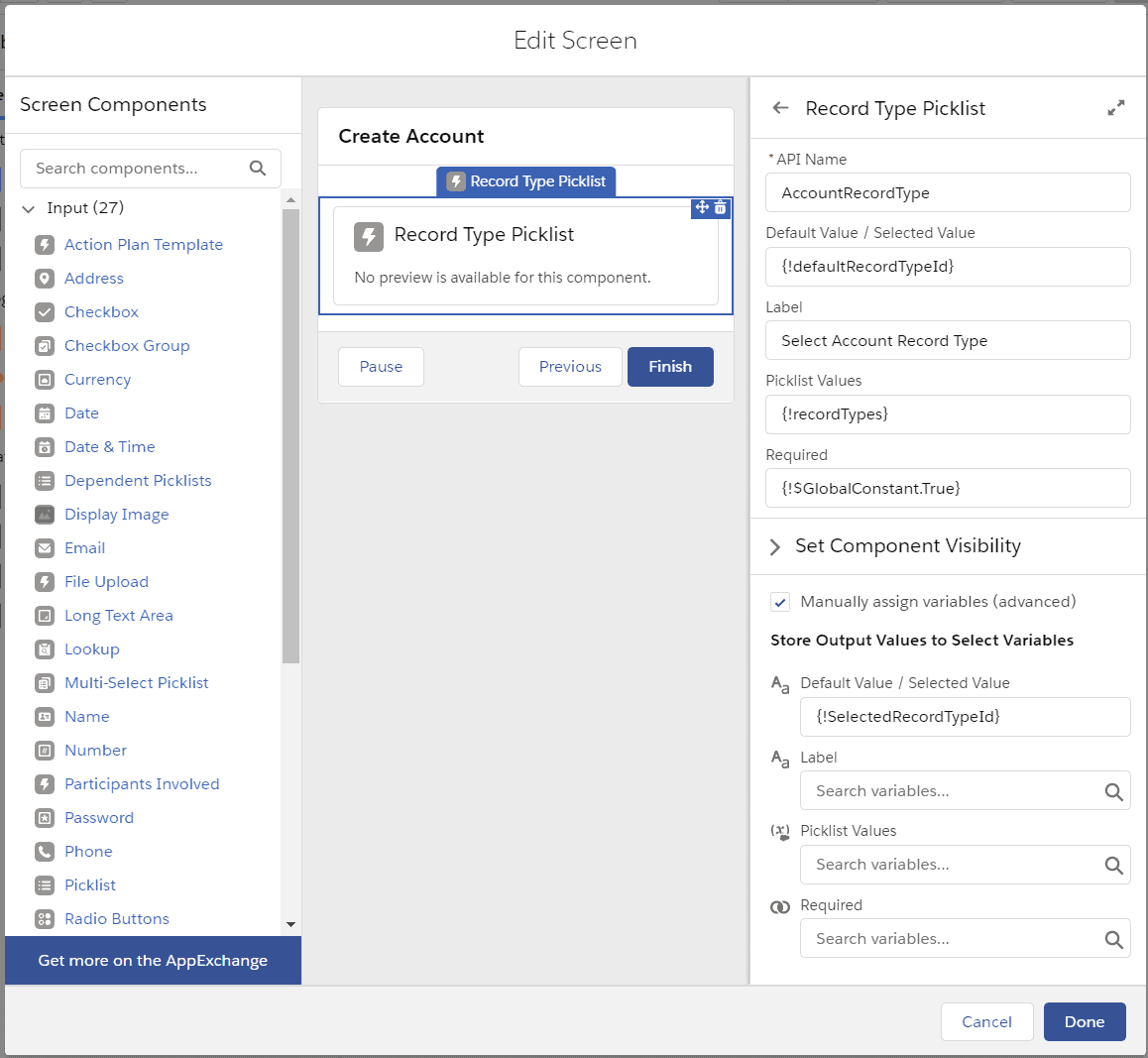
Additionally, you can use the Redirect Flow – Record Id and Redirect Flow – URL as a button in a Screen.

After selecting the Action in the Flow Screen, you can then fill in the appropriate information, such as the Record Id or the URL. The Button Label will display to the User as the button.

The button will display as below.


Leave a Reply

This site uses Akismet to reduce spam. Learn how your comment data is processed.

85 responses to “Flow Components – Redirect Flow – Record Id and URL”
  1. Ben Avatar
    Ben

    Hi Rich. Thank you as always for this effort. I updated my package to get the new redirect to ID action, but I’m getting an error. I call the flow from a url list button in a related list on the case object. Debug shows it’s getting the created record’s ID, so it seems to be beyond that.

    Unable to find action ‘redirectRecord’ on the controller of ecflc:flowIdRedirect Failing descriptor: {ecflc:flowIdRedirect}

    1. ben Avatar
      ben

      I’m guessing this related to how a case is “special”. If I call the flow from an action it works fine. I want the button on the related list though. 🙁

      1. Rich Englhard Avatar

        Hi Ben,
        I don’t think it has to do with the case, but perhaps that it is on the related list. You say that you’re getting the created record Ids? What are you trying to redirect to? Are all of the ids in a single variable or are you filtering to a single record id?

      2. ben Avatar
        ben

        Yeah I do think it is it being in the related list. It’s like the flow is stuck in that iframe or whatever it is now and can’t get out.
        The new record is created for sure and I am trying to redirect to the new record page. I’m using the record id from the single record variable that I assign values to and then create.
        I have since moved the create part to a lightning tab/flow component which does work, so probably that related list bit like you said.

      3. Rich Englhard Avatar

        I did release a patch last night if you want to update from the appExchange to 1.3.1 and try again, let me know if that works.

      4. ben Avatar
        ben

        I updated, but didn’t notice a difference still stuck in that frame. Everything works but that though. I’m going to blame salesforce. 🙂

      5. Rich Englhard Avatar

        I noticed for me it took a refresh or two of the page after the upgrade, didn’t work immediately. Try logging out and logging back in and trying one more time, if not, then something else must be going on…

  2. Ben Avatar
    Ben

    Is it possible to force this to open in the same tab?

    1. Rich Englhard Avatar

      Hi Ben,

      How are you launching this? It normally opens in the same tab.

      Rich

  3. Ben Avatar
    Ben

    This is running in a community page flow.
    1. Rich Englhard Avatar

      I had a feeling you were going to say that… Community navigation is a bit different unfortunately. At the moment, in communities, that’s the only way that it works.

    2. Rich Englhard Avatar

      Hi Ben,

      If you redirect using a URL, you should be able to redirect to “/detail/”&{id} and it will open in the same page. Just tested and confirmed this functionality. Community navigation is a bit different, so this is the reason that you were opening to a new tab.

      1. Robert Winger Avatar
        Robert Winger

        Hi Rich,

        We are are also running Redirect Flow – URL in Experience Cloud. We have a button that passes a URL and some parameters to a payment system. That seems always open a new tab.

        Do you have any ideas on how we might get around the new tab when redirecting to an external web page?

      2. Rich Englhard Avatar

        Hi Robert,

        That is how it works in communities with redirect in certain circumstances, I’m not sure how to change that at this time, or if it is possible.

        Rich

  4. Ben Avatar
    Ben

    Ha, no worries. Maybe I can finish inside a community page. Just somewhere where the flow won’t restart.

    1. Rich Englhard Avatar

      Try the run flow button, there is a setting to be able to refresh the record when the flow finishes as well as reset the flow to a button, that might take care of it for you.

  5. Ben Avatar
    Ben

    Great idea, but I need to be able to pass in a component variable unfortunately. It’s a knowledge article Id for some legal stuff. That allows the page builder (generally marketing) to change that if needed. I could hard code it in the flow instead, but it’s just different than they’re used to.

  6. Ben Avatar
    Ben

    I’m also seeing this error even after creating an input/output (just in case) variable named recordId.

    The value null is being provided for variable recordId but isn’t compatible with the variable’s data type (String).

  7. Sarah Avatar
    Sarah

    Hi Ben,

    I have to create a list view button/quick action in lightning page which launches the flow to create a record and once created need to redirect to record detail.
    I have created a lightning button with floe url to launch the flow and using it on the list view as for some reason I could not get the lightning quick action show up in the Lightning list view.

    When I click on the lightning button on list it launches a flow and creates a record but failing to redirect. I am using lightning action(referencing the component to redirect to record) in flow and passing the record id in the flow but, still does not navigate to record detail when flow finishes. Can you please help in what could be the best approach to this ?

    1. Rich Englhard Avatar

      Hi Sarah,

      In our new release (coming soon!) we should have the ability to redirect to a flow in lightning. The issue right now is that the flow is running in classic runtime, even with lightning “activated”, so the navigation doesn’t work since it started in classic. With the upcoming release, we have a way to have it launch to a lightning component (instead of launching directly into the Flow URL), which allows up the update. Stay tuned!

  8. Andy Engin Utkan Avatar

    Hello Rich, this is awesome, thank you. Is there a solution that allows for a redirect in the same browser window? User gets the pop-up blocker message on mobile (I think it is enabled by default on iOS).

    1. Rich Englhard Avatar

      Hi Andy,

      Can you let me know more about the use case? Is this in the mobile app, in a community, etc? Thanks!

      Rich

      1. Andy Engin Utkan Avatar

        Sure Rich, thanks for the reply. The user is on an iPhone accessing a community public page that is running a flow on it. At the end of the flow, I would like to send them to a URL. When I use your component, it works well on desktop. On the iPhone, I get a pop-up blocked message (I think pop-ups are blocked by default). I was wondering if I could redirect in the same browser window.

      2. Rich Englhard Avatar

        Hi Andy,

        If you redirect using a URL, you should be able to redirect to “/detail/”&{id} and it will open in the same page. Just tested and confirmed this functionality.

  9. Andy Engin Utkan Avatar

    Thank you.

  10. Mo Avatar
    Mo

    I tried both the Record and URL Redirect Actions: No error messages, but not redirection occurs. I used variables and hardcoded values for testing. Any clue what I’m doing wrong?

    1. Rich Englhard Avatar

      Hi Mo,

      How are you launching the flow, via a URL? If so, please try using a quick action type of Flow instead with recordId as the input variable for the record. The URL button still runs without lightning navigation service, so the redirect doesn’t work when using the older URL calling the flow through a button.

      Rich

  11. Karen Avatar
    Karen

    Hi

    I’ve set this up in my Flow as a core action (Redirect Flow – Record Id), using the variable {!recordId}, but it just takes me back to the original record and not the newly-created record.

    I’m new to Flows and to variables, so I’m not sure what I need to do to have the new record open?

    Thanks in advance

    Karen

    1. Rich Englhard Avatar

      Hi Karen,

      The {!recordId} variable is the id of the record that started the Flow, which is why it is redirecting you to the original record. In the Flow, when you make your update, there should be an Id that is assigned to the new record. If you use that variable, perhaps if you named it contact it could be something like {!contact.Id}, then it should redirect you to the id of that new record instead of the original one. I hope that helps!

      Rich

  12. roy Avatar
    roy

    Hi,
    I’m trying to use the Redirect to a Record Id using a Field service mobile flow but I cant find the action.
    As a work around I created a screen flow with the above action and tried to save (“save as”) it as a mobile flow and I’m getting the following error:

    Redirect_to_Checklist (Action) – The action type “Local Actions” can’t be used in flows with the process type “Field Service Mobile Flow”.

    1. Rich Englhard Avatar

      Hi Roy,

      I believe this is a limitation of Field Service Mobile. One of the Flow limitations is:
      Flows don’t support the following elements. Adding these elements to a flow causes it to immediately display an error.
      Lightning components (except for file upload)

      https://help.salesforce.com/articleView?id=sf.mfs_flow_considerations.htm&type=5

  13. Daniel Dobies Avatar
    Daniel Dobies

    Hi, I’m trying to launch the flow using a custom button with the URL of the flow because I need to put this button in a Search List View and it is the only kind of button that I can put there (I tried with an action button with the flow and also I tried an action button with a LWC but I can’t associated them to the Search List View).

    My problem is when I tried to use this from a Community. There is no way to get back to previos page. Do you know if exist a way to do wat I want to do? I mean, to launch the flow from the Search List View and once the flow has been finished return to the same Search List View.

    1. Rich Englhard Avatar

      Hi Daniel,

      What does your URL look like? Are you using the Flow Components run from a URL? If not and you’re using the old URL, it still runs in classic runtime (just looks like lightning). https://englhardconsulting.com/call-flow-in-lightning-runtime-through-a-url/

      Additionally, check out the note on redirecting in communities in this post – https://englhardconsulting.com/run-flow-button-updates-winter-21/

      Rich

      1. Daniel Dobies Avatar
        Daniel Dobies

        Hi Rich! Thanks for your quickly answer!

        About my problem, well I have to tell you that since I posted my problem the developer that work with me he founds a solution. Now the flow is invoked from a LWC and at the end it is redirected to the created record (Loan). it’s work fine!

        But, I will put another redirection in the flow, when I have some problems to create the Loan (business matters/problems) I want to redirect the flow to this URL:

        Loan__c/00B1k000002fy1REAQ

        So, according with the link that you send me, I have to make the URL as:

        “/detail/”&{00B1k000002fy1REAQ}

        (00B1k000002fy1REAQ is the “name” of the Search List View of Loan).

        Is that correct?

        Thanks a lot Rich!!

        Daniel.

      2. Rich Englhard Avatar

        Hi Daniel,

        If you’re doing the list view, you’ll have to go to the list view in the community and see the url structure to copy, that url structure I sent is specific to a record.

        Rich

  14. Melissa Avatar
    Melissa

    Can you navigate to a url outside of Salesforce?

  15. Harry G Avatar
    Harry G

    I’m trying to use the Redirect URl, but it does not work. I have tried both the Button and Action, with a variable with the value “/o/Contact/list” (and many other variations, but no success. This is very promising, and quite needed. Please help!

  16. Jan Cervenka Avatar
    Jan Cervenka

    Hi There

    I am afraid this does not work for me when I place my flow containing the redirect action to a community site. It gives me an error – I suspect this is due to security settings – do you have any advice how to resolve this issue?

    Thanks in advance!

    1. Rich Englhard Avatar

      Hi Jan,

      If the flow is running correctly before the redirect, then the issue might be that you’re redirecting without communities in mind. If you’re redirecting in communities, you’ll need to have your URL start with /detail/ and then your id. I’d suggest using a formula and the redirect to URL component. Take a look at this post. https://englhardconsulting.com/run-flow-button-updates-winter-21/

      1. Jan Cervenka Avatar

        Hi Rich

        Thank you for getting back to me – I tried setting the url to https://google.com just to see what happens and Flow is showing this error:

        Error Occurred: We can’t execute this action. Ask your admin to check that the “ecflc:flowURLRedirect” Lightning component’s client-side controller includes an “invoke” method and that My Domain is enabled and deployed for your org.

        Do you have any idea why this could be? I am using currently testing the components in a Sandbox.

        Thanks a lot for your time.

      2. Rich Englhard Avatar

        Hi Jan,

        Do you have My Domain enabled? If not, you’ll need to enable it. – https://help.salesforce.com/s/articleView?id=sf.domain_name_setup.htm&type=5

      3. Jan Cervenka Avatar

        Hi Rich,

        Yes, it is enabled – I made no changes to that when I created the sandbox from production where we have My Domain enabled.

      4. Jan Cervenka Avatar

        Hi Rich,

        This may help – I also installed another lightning component I was having issues adding to my community.

        The developer said this was due to my site being set as Relaxed CSP environment and made some changes to the component which made it work.

        I have tried changing my site’s settings to Strict CSP – it has not resolved the issue, I am afraid.

  17. Luke Polishak Avatar
    Luke Polishak

    Hi Rich,

    Is there some sort of managed packaged that needs to be downloaded to use the Redirect Flow? I am not seeing these an possible actions to choice from.

    1. Rich Englhard Avatar

      Hi Luke,

      Yes there is. You can download the package “Flow Components” for free from the appexchange. Check out this blog post to learn more! https://englhardconsulting.com/flow-and-lightning-components-package/

      1. Luke Polishak Avatar
        Luke Polishak

        Rich,

        Appreciate the quick response. Do you know if it would be possible to use it to redirect to the edit lines screen in CPQ? Or is there the potential to run into an issue there?

      2. Rich Englhard Avatar

        Hi Luke, yes, it is an apex page, so you should be able to redirect to it.

  18. Mike Avatar
    Mike

    Hi There,

    I have a flow that I launch via URL from a list view. It takes the IDs passed in via the selected checkboxes on the list view. All was fine, but I wanted to make use of your Redirect Flow – URL component. When I added it the button I made doesn’t work when clicking. So I read that I need to launch it via the lightning runtime using the RunFlowFromURL. I did this but was getting an error: “Invalid request, post must use JSON.” So I read that the work-around was to change the setting on the custom button to disable “Display Checkboxes (for Multi-Record Selection)
    .” This got rid of the error, however now it’s not passing in the IDs of the checked records.

    I’m trying to launch a screen flow in lightning runtime using this link:
    /lightning/cmp/ecflc__RunFlowFromURL?c__recordId=0&c__flowName=Add_Parent_Account_Process

    I’ve set the recordid to 0 because at the time of the link rendering I don’t know what the IDs are that will be selected.

    Is there a way to get the IDs of the checked items passed in properly using this method?

    1. Chris H Avatar
      Chris H

      Mike – I have the same question and a similar use case. I am trying to launch a flow from a list view button, so I have to use either a custom button (which doesn’t use lightning runtime) or the new method (https://englhardconsulting.com/call-flow-in-lightning-runtime-through-a-url/), but I can’t get the redirect to work with option 1 and with option 2 I’m unable to collect the selected record ID’s from the list view and I receive the same error – “Invalid request, post must use JSON”.

      Hopefully we can be advised of a workaround to navigate to a dynamic URL from a list view button!

      1. Mike Avatar
        Mike

        I didn’t get a reply so just went back to the default way of doing it without using this library. Fingers crossed you receive some kind of response.

      2. Rich Englhard Avatar

        Hi Mike and Chris,

        You can do this. Instructions are almost the same for the related list post, https://englhardconsulting.com/related-list-button-to-send-records-to-flow/, but the difference is that you’ll be using the list view object as the standard controller. So if you’re on Account, use Account as the standard controller and add the URLFOR button to the Account object. It can handle passing in ids (you’ll need variables, ids (collection, input) and recordId (collection, input) even if you’re not going to use them since the lightning component requires it) so you can iterate over them, redirect to them, etc. Since you’re on a list view, there is not a single record Id, so you don’t add the recordId=Account.Id since that doesn’t exist. So, you’ll need the VF page to handle the id collection which also redirects to the lightning component, which allows the lightning component to redirect. Let me know how it works for you, I’ll have to work on a post specific for list views!

        Rich

      3. Chris H Avatar
        Chris H

        Rich – thanks for the reply! I hadn’t seen that article but it does have very similar config. I believe I followed your instructions correctly with the VF page and the LV button, but when I click the list view button I just get a blank white page. No errors or browser redirect issues. Permissions are all set.

        I’m using a custom object APXT_Redlining__Contract_Agreement__c and the API name of my screen flow is Flow_Batch_LV_Button.

        Here’s the VF page:

        Here’s the LV button:
        {!URLFOR(‘/apex/Contracts_to_Flow’,null,[flowName=”Flow_Batch_LV_Button”])}

        Any ideas?

  19. Dan Gones Avatar
    Dan Gones

    Where is the package for this am i missing it??

  20. Anjan Avatar
    Anjan

    Hi Rich,

    Good Day!

    I have a use case. I wan to redirect to child record detail page(Loan) from Parent( Account). Action should be peform from NBA screen on Account page. This should use Flow internally for rediection. Can you please suggest me a solution.

    Note: I dont want to create any custom component.

    Thanks,
    Anjan

  21. Austin Avatar
    Austin

    It does not seem to redirect if a screen flow is launched via a custom link button

    1. Rich Englhard Avatar

      Hi Austin,

      Correct, it doesn’t work with the custom link button, those buttons run in classic navigation, not lightning navigation. I suggest that you use an action instead or you can call a flow in Lightning Runtime through a URL following this post. – https://englhardconsulting.com/call-flow-in-lightning-runtime-through-a-url/

      Rich

  22. Michael P Avatar
    Michael P

    Hi Rich,

    Firstly thank you for developing this and pushing it out free of charge.

    I have a use case that I was wondering if it were possible to achieve using Flow Components.

    I want to re-direct to a URL outside of Salesforce and also potentionally re-direct in a way that mailto: would be invoked to open the users default application for sending emails.

    Do you reckon this is possible?

    Kind Regards
    Michael

    1. Rich Englhard Avatar

      Hi Michael,

      Did you try using mailto:email@email.com (replacing email with the correct email) with the redirect to URL component?

  23. Ankur Avatar
    Ankur

    what need to be installed to get the options in the flow

    1. Rich Englhard Avatar

      Hi Ankur,
      You can install Flow Components directly from the AppExchange. https://appexchange.salesforce.com/appxListingDetail?listingId=a0N3A00000FvN3wUAF
      Rich

  24. Jim Montgomery Avatar

    I have this installed and configured, but when the flow runs, the button to redirect in inactive.

    1. Rich Englhard Avatar

      Hi Jim,

      How are you launching the flow?

      Rich

      1. pagescanz Avatar

        From a custom action button on the page

  25. Valerio Avatar
    Valerio

    Hi!
    we use “Redirect Flow – Record Id” in a screen flow but when clicking on the button nothing happens, I don’t see errors in the console. The flow is launched in modal mode from a Flow Button component on a flexi page, there we pass to the flow the recordId of the flexiPage. The record Id is correctly populated and we use this value in the Redirect component.
    We use the same component in an another screen flow launched by the same flexi page and here the button “Redirect Flow – Record Id” works properly.
    Could you kindly suggest checks that we can do to debug why in that specific case the redirect button does not work?

    Kind Regards,
    Valerio

    1. Rich Englhard Avatar

      Hi Valerio,

      The navigation service with lightning has to run, so if the flexi page is hosting a visualforce page and the visualforce page is running the flow, that could be the issue. Are you using to run the flow? How are you starting the flow in the flexipage?

      1. Valerio Avatar
        Valerio

        Hi,

        thank you for the feedback! Actually we are running the flow from a Flexi page using a flow button component.
        Do you have in mind other possible causes?

        Kind Regards,
        Valerio

  26. Maneesh Avatar
    Maneesh

    Am not sure why but the redirect actions are not working. I have used them as Action and also as screen elements. Nothing happens.

  27. Leila Avatar
    Leila

    I’m the same as Maneesh…any help would be a massive saver!

    Englhard..you’re our only hope!

  28. Andy Shelton Avatar
    Andy Shelton

    I installed the package from appexchange but I can’t find the components in the flow builder

    1. David Avatar

      Same here. I can see “lock record” and “unlock record”, but nothing comes up for “redirect”.

  29. David Avatar

    I was trying to use this at the end of a record triggered flow, which deletes the record a user is currently viewing and creates a new record on another object. Unfortunately, this component doesn’t seem to work on record triggered flows, which is strange because I believe we already have the capability of redirecting from screen flows.

    1. Rich Englhard Avatar

      Hi David,

      Correct, the redirect only works with screen flows. There isn’t a way to change something in the UI unless you go with a custom button, when something saves, it could be an API that saves it, it could be a user, so there is no navigation on record triggered flows or apex triggers. You need to have a screen flow/lightning component/visualforce page and redirect the user after the save through a button click. As of right now, there is not an out of the box way to redirect a screen flow in Salesforce.

      Rich

  30. Lakshmi S Avatar
    Lakshmi S

    Hello , May I ask if we can display a powerpoint presentation from a screenflow element? My objective is to Run a screen flow for a demo and I dont want to switch between Powerpoint slides and Salesforce screen. Is this achievable? If yes, how? if not, what else I could do?

    1. Rich Englhard Avatar

      Hi Lakshmi,

      I am not sure, I have never seen a powerpoint inside of a screen flow. Let us know what you find out!

      Rich

  31. Bhavitha Avatar
    Bhavitha

    Hi,
    created a screen flow to delete record calling flow using quick action
    i want to add “navigate to url ” action element in flow
    please help me with the actual steps

    1. Rich Englhard Avatar

      Hi Bhavitha,

      You’ll need to install Flow Components from the AppExchange, it’s a free app. Then you’ll see the navigate to url action.

      Rich

  32. Anthony Waring Avatar

    Hi Rich,

    I hope you’re well.

    I am trying to pass through the record Id into the screenflow using code in the custom URL followed by your url. However, I can’t seem to redirect to the record when using both in conjunction.

    This is my URL below:
    /flow/Create_New_Right_screenflow?recordId={!Sponsorship_Rights__c.Id}&retURL={!Sponsorship_Rights__c.Id}/lightning/cmp/ecflc__RunFlowFromURL?c__recordId={!Rights__c.Id}&c__flowName=Create_New_Right_screenflow

    The first part is bringing through the record Id of object Sponsorship right (master detail relationship) and yours is redirecting to a new Rights__c record.

    If I remove the record Id passing it works but I am not sure if I am missing something in the URL. (Or even if possible).

    Many thanks,
    Anthony

    1. Rich Englhard Avatar

      Hi Anthony,

      You don’t need the /flow/ part, just the /lightning/ part and everything after. I “think” that should work.

      Rich

  33. Juan Fach Avatar
    Juan Fach

    Can I use Redirect Flow URL to redirect to an external URL passing the email ? for example:

    URL: https://www.surveydomain.com/{!Contacts.Email}

    1. Rich Englhard Avatar

      Hi Juan,

      Yes, you can pass variables into the url. I see your variable has an ‘s’ in it, it won’t work on a collection, but should work on a variable inside the collection.

      Rich

  34. Ravi Avatar
    Ravi

    Hi,
    I have a list view custom button and launching flow from this button. I added this redirect flow in the end and it is not redirecting. Flow loading again as new start.
    What ma I missing?
    Thank you
    Ravi

    1. Rich Englhard Avatar

      Hi Ravi,

      It won’t work in classic navigation. Follow the logic in this blog post, you can adapt it for a list view. https://englhardconsulting.com/related-list-button-to-send-records-to-flow/ The big thing is that you need to call the lightning component that will call your flow so that way it runs in lightning runtime, not classic runtime.

      Rich

  35. Alex D'Agostino Avatar
    Alex D'Agostino

    Hi Rich,

    I have tried using the Action Redirect Flow – URL and Redirect Flow – Record ID in a screen flow but neither are working when used in community. The flow works up until the redirect and then I receive an unhandled fault. The flow error that is emailed to me says the following,
    “Error element Redirect_to_Event_URL (FlowActionCall).
    We can’t execute this action. Ask your admin to check that the “ecflc:flowURLRedirect” Lightning component’s client-side controller includes an “invoke” method and that My Domain is enabled and deployed for your org.”

    The domain is enabled and deployed so I’m really struggling with what the issue could be. Please help!

    Alex

    1. Rich Englhard Avatar

      Does it work for an admin? Did you install for all users? There is an apex method that might need to be added to the community user’s profile/permission set to allow them to call it.

      1. Alex D'Agostino Avatar
        Alex D'Agostino

        Well, this is strange. We have an Org that has several different community pages. The redirects work for all pages except for one and I cannot, for the life of me, figure out why. I’ve tried combing through all the settings and permissions and haven’t noticed any discrepancies.

Discover more from Englhard Consulting LLC

Subscribe now to keep reading and get access to the full archive.

Continue reading